tp
Crypto1010 Developer Guide
Acknowledgements
- Java Platform, Standard Edition 17 API documentation: https://docs.oracle.com/en/java/javase/17/docs/api/
- JUnit 5 User Guide (for unit testing approach and assertions): https://junit.org/junit5/docs/current/user-guide/
- Gradle User Manual (build and task orchestration): https://docs.gradle.org/current/userguide/userguide.html
- Password hashing: Java Cryptography Architecture (
PBKDF2WithHmacSHA256) from the Java standard library. - Address hashing: Bouncy Castle digest implementations (
KeccakDigest,RIPEMD160Digest).
Design & Implementation
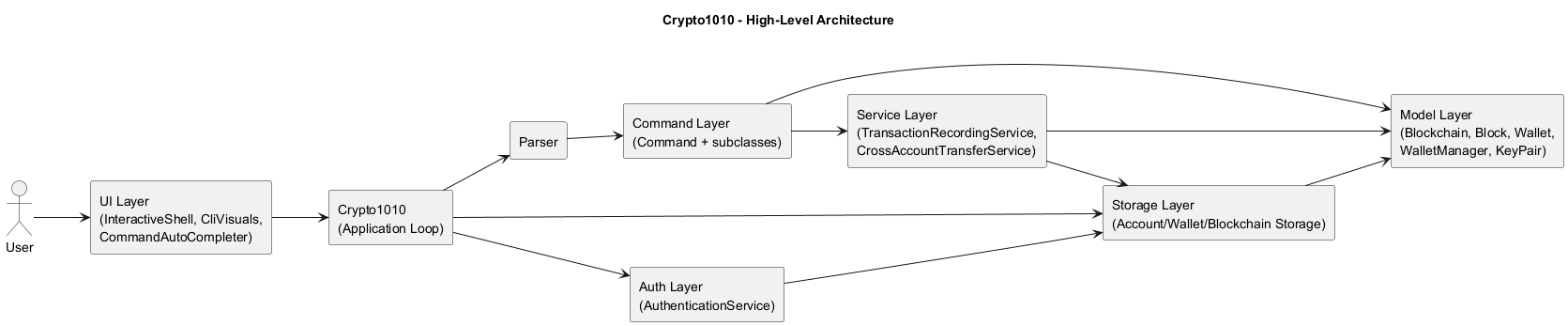
Crypto1010 is implemented as a modular command-line application with clear separation between authentication, input parsing, command execution, domain model, and persistence.
Architecture overview
Crypto1010manages the main loop, input capture, authentication handoff, and save/load lifecycle.authpackage handles account registration, login, and password hashing.Parsermaps raw user input to concrete command objects.commandpackage implements user-facing functionality (create,send,crossSend,balance,logout, etc.).servicepackage centralizes transaction logic shared across commands.modelpackage contains core blockchain and wallet state plus invariants.storagepackage persists account credentials and account-scoped blockchain/wallet data.uipackage manages CLI rendering (CliVisuals) and interactive input (InteractiveShell,CommandAutoCompleter).
Parser and command subsystem
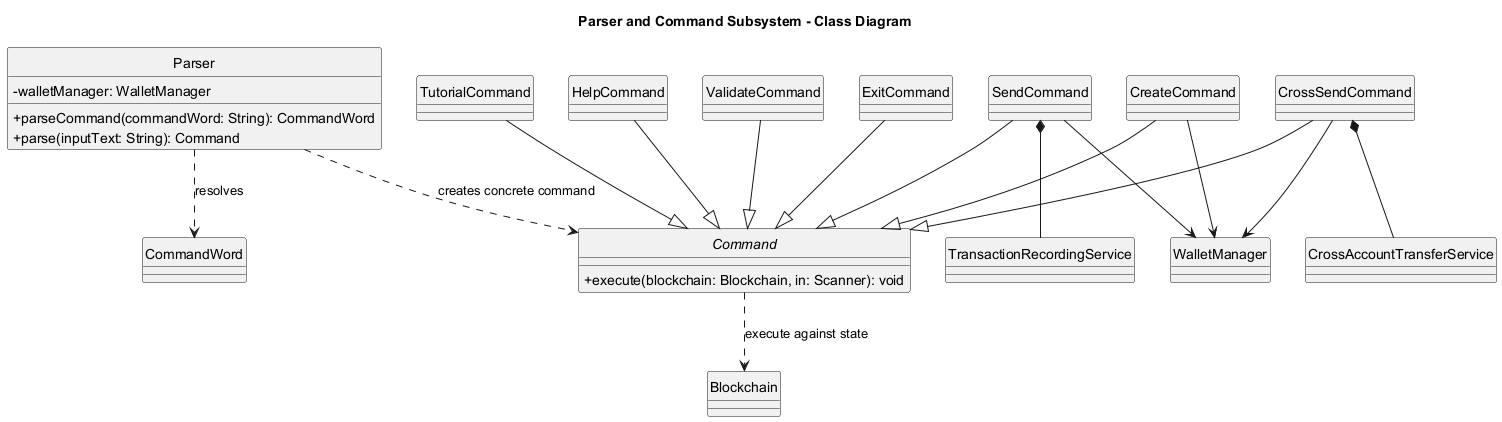
Structural view (class diagram)
The class diagram below introduces parser-to-command construction and core command hierarchy before runtime interactions.
Command execution flow
The following sequence diagram shows the standard command path after a user is authenticated:
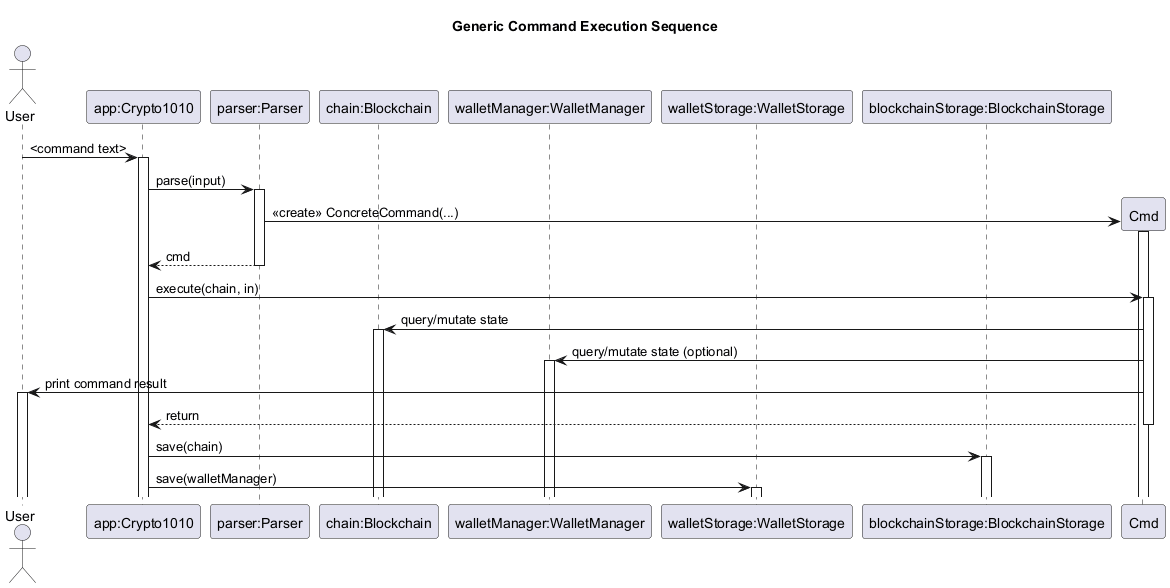
- User enters a command string.
Crypto1010passes the raw input toParser.Parserconstructs a concreteCommandobject.Crypto1010executes the command with the current in-memoryBlockchainandWalletManager.- On success,
Crypto1010persists both blockchain and wallet states when save is enabled for that session. - If a save operation fails, the app exits to avoid continuing with potentially inconsistent persistence state.
Authentication subsystem
Structural view (class diagram)
The class diagram below introduces account credential management and password hashing structure used during login/registration.
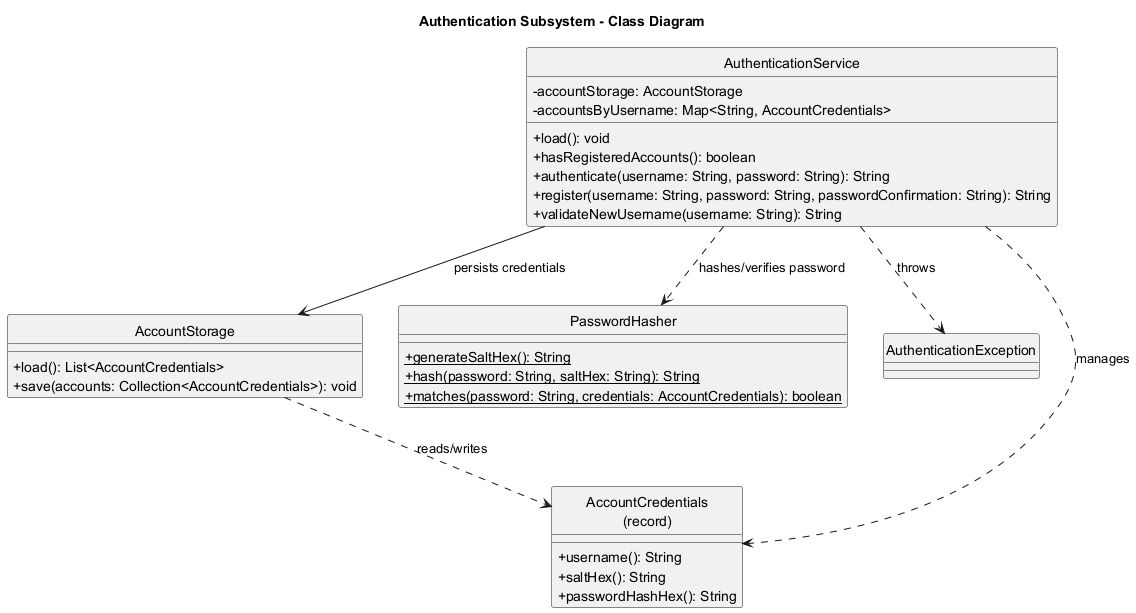
Key authentication behavior:
- Password storage uses per-account random salt + PBKDF2 (
PBKDF2WithHmacSHA256) derived hash. - Username lookup is case-insensitive through normalized lowercase keys.
- Login throttling is in-memory per username: after 5 failed attempts, login for that username is blocked for 30 seconds.
- Credential files support an HMAC signature header; when present, signed content is verified during load.
CLI shell, prompt, and tab completion
InteractiveShellwraps JLine when a non-dumb terminal is available; otherwise it falls back to scanner input.Crypto1010uses a shared shell and a mode-awareCommandAutoCompleteracross the full app lifecycle.- Completion scopes are switched explicitly:
- pre-login (auth mode):
1,2,3,login,register,exit - post-login (command mode): command words plus context-aware prefix/value suggestions
- post-logout: returns to pre-login scope
- pre-login (auth mode):
- Prompt format in authenticated sessions is
USERNAME@crypto1010 ~.
Design rationale:
- A single shell/completer instance avoids terminal reinitialization issues that can break completion after login.
- Explicit mode switching prevents suggestion leakage between authentication and command execution contexts.
Adding a new command
- Add the new keyword and description to
CommandWordso it appears inhelp. - Implement a new
Commandsubclass in thecommandpackage. - Update
Parser.parse(...)to construct the new command. - Add focused JUnit tests under
src/test/java/seedu/crypto1010/command. - Add a manual test case in this guide.
Blockchain and Block subsystem
This section documents the enhancement: the blockchain core (Blockchain, Block) and integrity-first validation flow that powers validate, send, and persisted-chain loading.
Scope of enhancement
- Tamper-evident block representation with deterministic SHA-256 hashing.
- End-to-end chain integrity checks across index, hash linkage, and transaction semantics.
- Transaction-safe balance validation during chain verification.
- Controlled block append path for new transactions.
- Persistence gatekeeping: reject corrupted blockchain files at load time.
Architecture-level design
The blockchain subsystem is centered on two model classes:
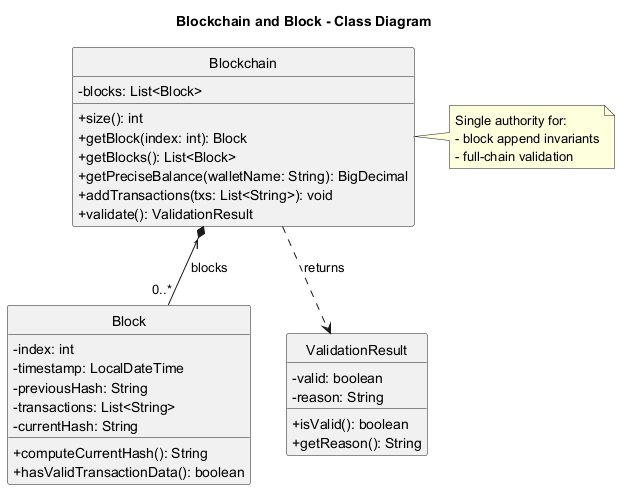
Block: immutable record of block payload fields and hash computation.Blockchain: ordered aggregate and the single authority for chain validation and block appending.
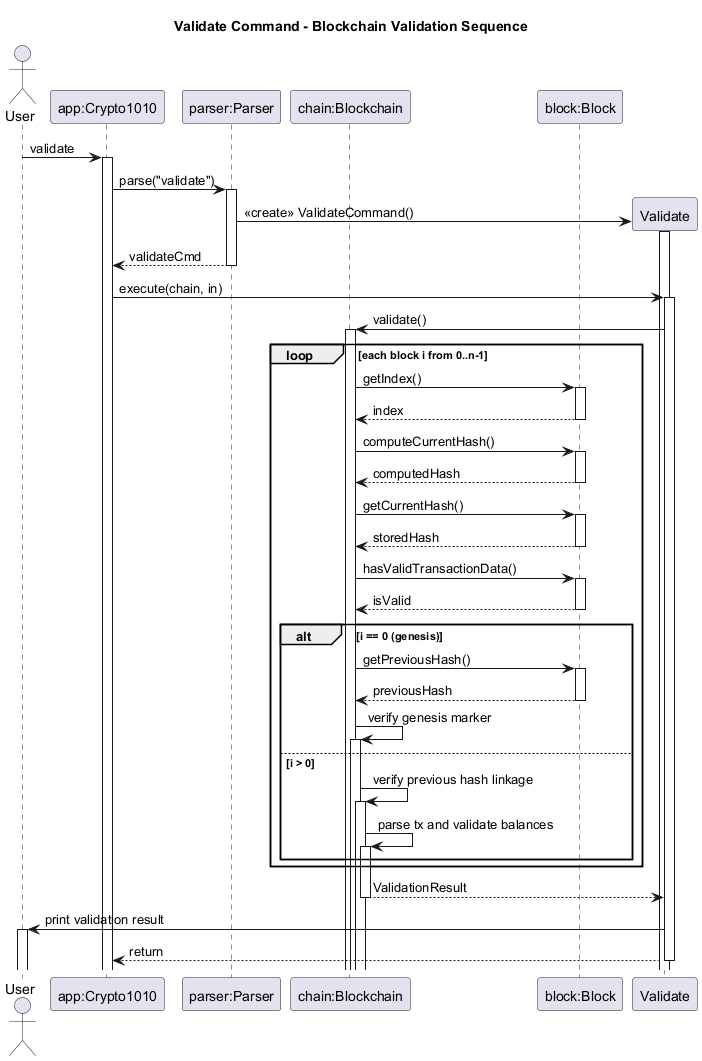
ValidateCommand delegates all integrity checks to Blockchain.validate(); command layer does not duplicate blockchain logic. BlockchainStorage.load() also invokes validate() after deserialization. This means both interactive validation and startup data loading use the same invariant checks, avoiding drift between runtime and persistence behavior.
At system level, the flow is:
- Commands mutate/query blockchain through
BlockchainAPIs. Blockchainowns block construction and linkage rules.- Storage serializes/deserializes raw state.
- Validation logic gates acceptance of loaded data.
This keeps blockchain rules in one place and reduces the risk of inconsistent behavior between command paths.
Structural view (class diagram)
The class diagram below introduces the static structure before runtime interactions.
Component-level design
Block design choices:
- Block state includes
index,timestamp,previousHash,transactions, andcurrentHash. computeCurrentHash()recomputes SHA-256 from the full payload (index|timestamp|previousHash|joinedTransactions).hasValidTransactionData()enforces non-empty, non-blank transaction entries.
Why this design:
- Recompute support enables tamper detection without trusting stored hash values.
- Hashing full payload makes any transaction/link/timestamp modification detectable.
- Lightweight representation stays easy to serialize while still being integrity-aware.
Blockchain design choices:
- Internally stores blocks as a mutable list, exposed as unmodifiable view for read access.
addTransactions(...)is the only append path: it always derivesnewIndex = last.index + 1andpreviousHash = last.currentHash.validate()runs deterministic checks in a fixed order and returns a structuredValidationResult.
Validation stages in Blockchain.validate():
- Structural checks:
- chain non-empty
- block index continuity (
block.index == iteration index)
- Cryptographic consistency:
block.computeCurrentHash()equals storedblock.currentHash
- Data quality:
- no blank/null transactions
- Genesis constraints:
- previous hash equals fixed genesis predecessor
- transaction data is exactly
Genesis Block
- Linkage checks for non-genesis blocks:
block.previousHash == previousBlock.currentHash
- Economic/semantic checks:
- transaction format must match
sender -> receiver : amount - amount must be positive
- sender must have sufficient running balance
- exempt accounts (e.g.,
network,network-fee) bypass balance enforcement
- transaction format must match
Balance validation strategy
Validation uses a running Map<String, BigDecimal> keyed by normalized account names.
- For each parsed transaction:
- sender balance is checked/decremented (unless exempt).
- receiver balance is incremented (unless exempt).
- If any sender lacks funds at that point in chain order, validation fails immediately.
Rationale:
- Enforces causal ordering semantics (a transfer is only valid if funds existed before that transaction).
- Keeps validation deterministic and independent from wallet objects.
- Uses
BigDecimalto avoid floating-point precision drift.
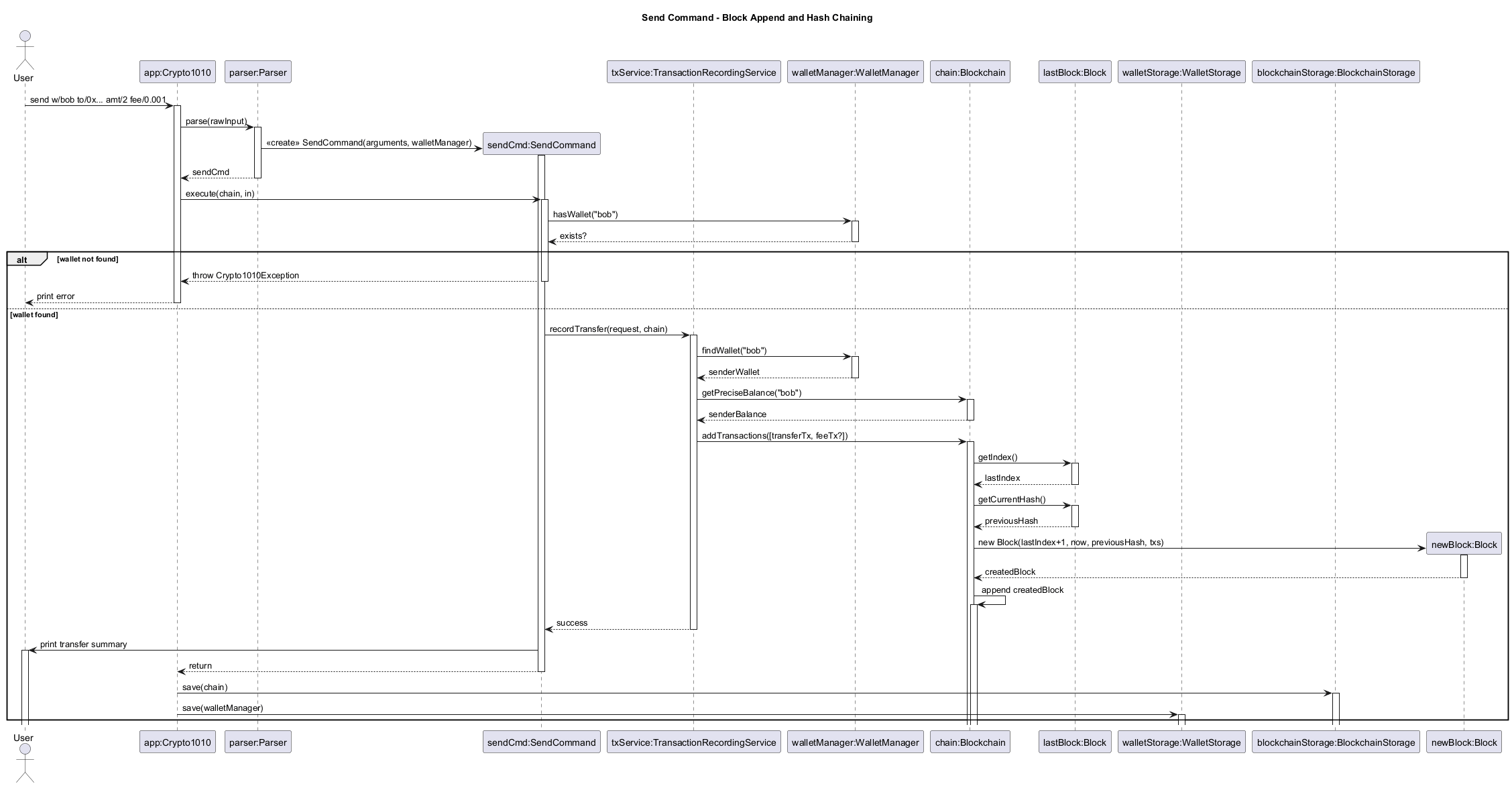
Block append behavior from transfer flow
SendCommand delegates to TransactionRecordingService, which composes one or two transaction strings (transfer + optional fee) and calls Blockchain.addTransactions(...).
Blockchain.addTransactions(...):
- rejects empty transaction batches.
- obtains the last block.
- builds a new block with current timestamp and last block hash as predecessor.
- computes new block hash at construction.
- appends to chain.
This ensures hash linkage is always created from canonical in-memory state, not externally supplied values.
Interaction views (sequence diagrams)
Validation flow:
Append flow during send:
Persistence interaction
BlockchainStorage serializes blocks to JSON and reconstructs them on load.
After parsing JSON into Block objects, it calls validate(). Invalid chains are rejected with an IOException, and app startup falls back to a safe default chain. This prevents partially tampered or malformed persisted state from silently entering runtime.
Alternatives considered
- Recompute balance on demand for each transaction during validation without a running map:
- Rejected because it is less efficient and harder to reason about for long chains.
- Put transaction-format validation in command/service only:
- Rejected because persisted data could bypass command checks; blockchain-level validation must be authoritative.
- Allow direct block injection (
addBlock(Block)API):- Rejected to reduce misuse risk.
addTransactions(...)preserves index/hash derivation invariants.
- Rejected to reduce misuse risk.
- Skip validation during storage load for faster startup:
- Rejected because startup should fail-safe against tampered files.
Trade-offs and known limitations
- Chain validation currently scans all blocks each run (
O(n * txPerBlock)), acceptable for project-scale data but not optimized for large ledgers. - Hashing uses payload string concatenation; robust for current format but not yet versioned for schema evolution.
- Exempt account model is pragmatic for simulation and fees but not a full consensus/economic model.
Planned next-step extension (post-v2.1)
The current implementation validates a complete chain each time. A planned extension is an incremental validation cache:
- store the latest validated block hash and running balances snapshot.
- on append, validate only new blocks against cached state.
- invalidate cache automatically after file import/load mismatch.
Reason for planning this enhancement:
- keeps correctness guarantees while reducing repeated full-chain scans for larger datasets.
- preserves the current fail-safe model because full validation remains available as a fallback path.
Wallet, WalletManager, and KeyPair subsystem
This section documents wallet identity and lifecycle management through Wallet, WalletManager, and KeyPair.
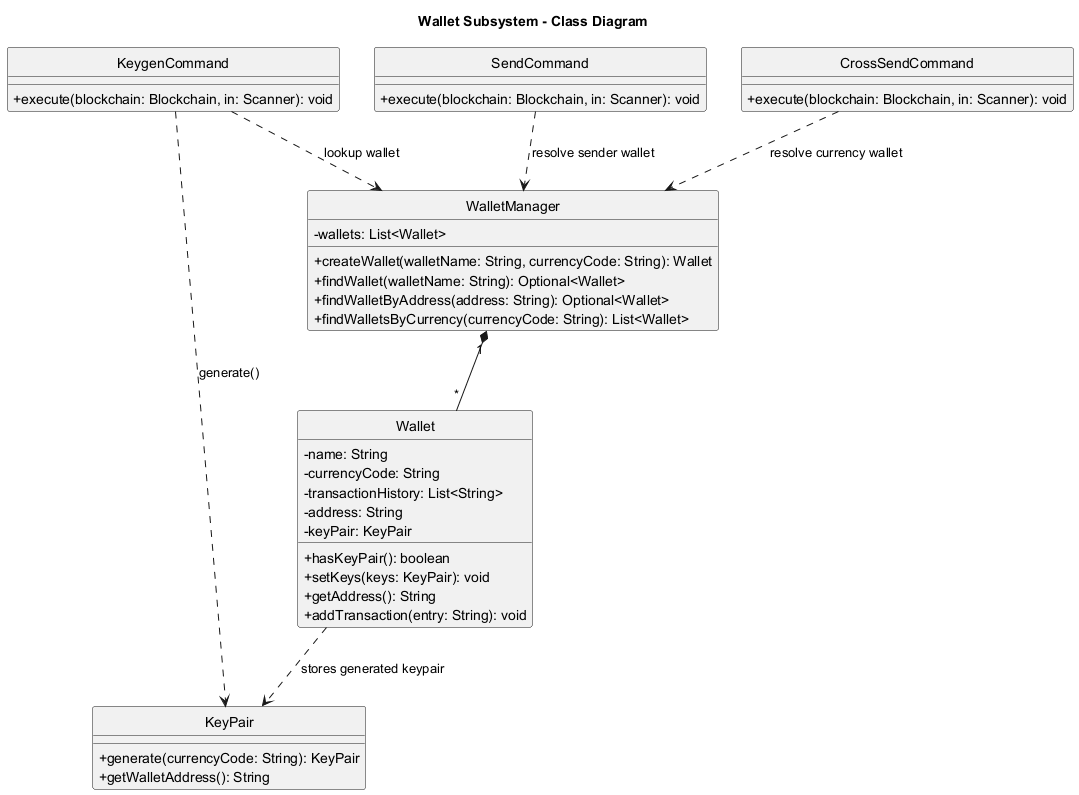
Structural view (class diagram)
The class diagram below introduces core wallet classes before command-level interactions.
Scope of enhancement
- secp256k1 keypair generation per wallet (
keygencommand path). - Currency-aware wallet management to support unambiguous
crossSend curr/...routing. - Address-based recipient resolution support for local-address sends.
Architectural-level design
The subsystem spans three model classes:
KeyPair: owns generated private/public secp256k1 values and derived wallet address.Wallet: mutable identity container (name, currency, optional keypair/address, outgoing history).WalletManager: lifecycle authority for creation and lookup (name/currency/address).
Wallet does not generate keys internally. KeygenCommand calls KeyPair.generate(...) and injects the result via wallet.setKeys(...).
Component-level design
KeyPair design choices:
- Generates secp256k1 private key and computes public key point via scalar multiplication.
- Verifies generated public key lies on curve before accepting output.
- Derives Ethereum-style addresses via Keccak-256 for
eth/genericcurrency wallets. - Derives Bitcoin Base58Check addresses via compressed pubkey + SHA-256 + RIPEMD-160 for
btc.
Wallet design choices:
- Address is null until keys are generated.
hasKeyPair()explicitly exposes keyed/unkeyed state.setKeys(...)is guarded at command level byKeygenCommand(regeneration blocked).- Currency code is normalized at construction time.
WalletManager design choices:
- Enforces unique wallet names (case-insensitive).
- Enforces at most one non-generic wallet per specific currency per account.
- Provides
findWalletByAddress(...)for local recipient resolution in send flow.
Trade-offs and known limitations
- This project generates addresses but does not sign/verify transactions with private keys.
- Keypairs/addresses are persisted in wallet storage and restored on load.
- Crypto model is educational and does not implement full production wallet standards end-to-end.
Tutorial
This section documents the tutorial enhancement.
Component-level design
TutorialCommand design choices:
- Encapsulates the full tutorial flow within a single command execution cycle.
- Maintains a step index (
int index) to track progression through predefined tutorial stages. - Uses static arrays (
instructions[],steps[],tutorialMessages[]) to define deterministic tutorial content. - Operates on a separate blockchain instance (
Blockchain.createDefault()) to isolate tutorial execution. - Delegates command interpretation to
Parserand execution to dynamically resolvedCommandobjects.
Why this design:
- Ensures tutorial state is fully self-contained and does not interfere with user-managed blockchain data.
- Enables reproducible step-by-step execution for educational purposes.
- Centralises tutorial logic within a single command, reducing cross-component coupling.
Structural view (class diagram)
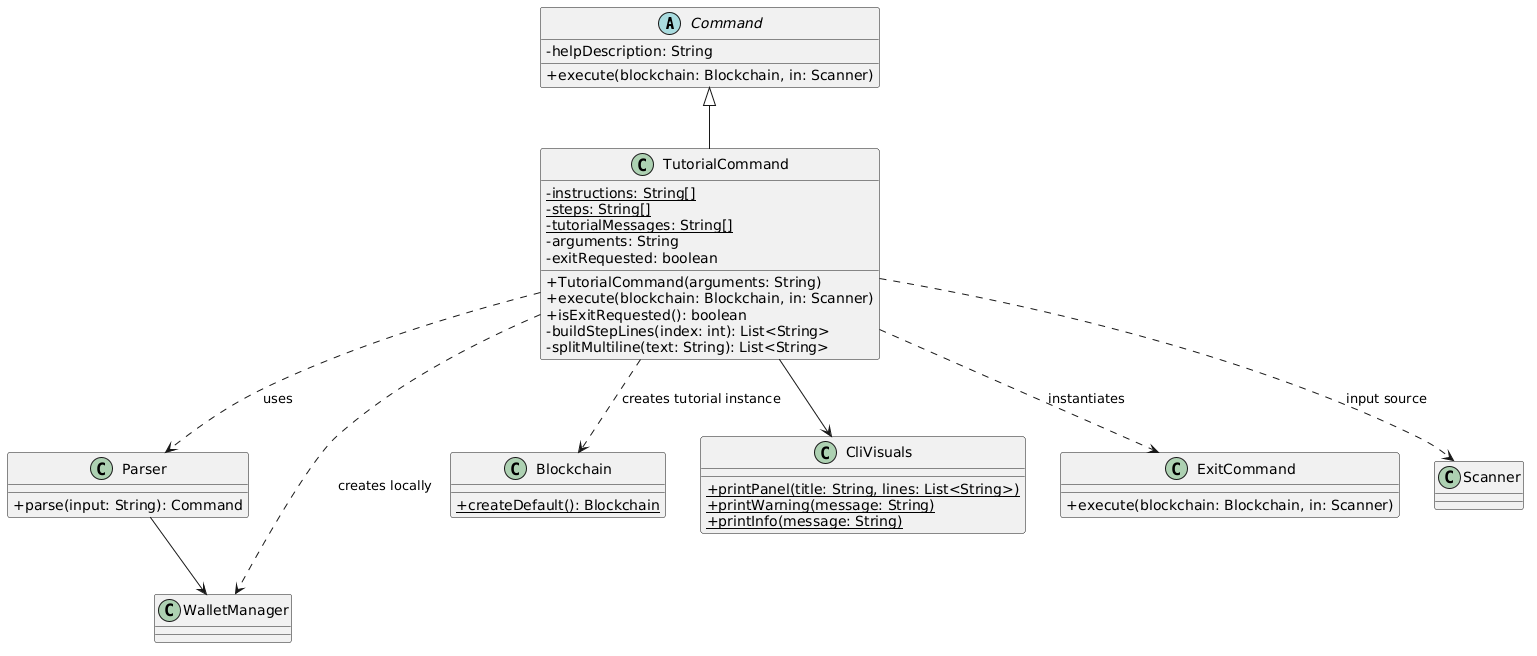
Input handling and execution loop
The tutorial uses a blocking input loop based on Scanner.nextLine():
- Each iteration renders the current tutorial step via
CliVisuals.printPanel(...). - The system waits for user input before progressing.
- Input is validated against the expected instruction for the current step.
Control flow behaviour:
- If input matches
"exit":- Immediately triggers
ExitCommand - Terminates the entire application
- Immediately triggers
- If input matches
"tutorial exit":- Breaks tutorial loop and exits tutorial mode only
- If input matches expected instruction:
- Parsed via
Parser.parse(input) - Executed on
tutorialBlockchain - Advances step index
- Parsed via
- Otherwise:
- Displays error message via
CliVisuals.printWarning(ERROR_MESSAGE) - Repeats current step
- Displays error message via
Tutorial Execution Flow
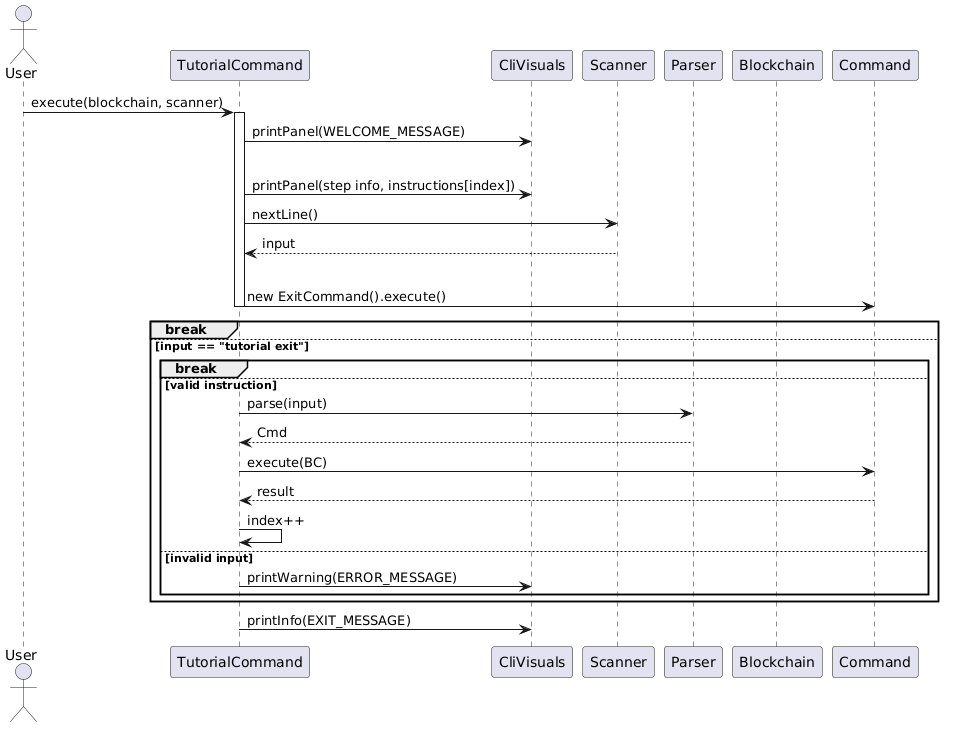
Tutorial data model
The tutorial content is defined as static arrays:
instructions[]: expected user inputssteps[]: step titles for UI renderingtutorialMessages[]: explanatory content per step
Rationale:
- Ensures strict alignment between explanation, instruction, and execution.
- Enables deterministic step progression without runtime generation overhead.
- Simplifies testing by making expected inputs explicit and index-driven.
Error handling strategy
Two layers of error handling are used:
- Input-level validation
- Invalid commands trigger
CliVisuals.printWarning(ERROR_MESSAGE) - Does not advance tutorial state
- Invalid commands trigger
- Execution-level validation
Crypto1010Exceptionis caught during command execution- Prevents tutorial crash and preserves current step
Design considerations
Isolation of state
- Separate
tutorialBlockchainprevents contamination of user data.
Strict step control
- User input must match given String exactly to continue (excluding trailing whitespaces).
- Index-based progression ensures linear, deterministic tutorial flow.
Reuse of command system
- Avoids duplicating logic by reusing
Parser+Commandexecution pipeline.
UI abstraction
- All output is delegated to
CliVisuals, ensuring separation of logic and presentation.
Limitations
- Linear progression only (no branching tutorial paths).
- Strict input matching reduces flexibility for users.
- Tutorial content is hardcoded, requiring code changes for updates.
- Blocking input loop limits extensibility for asynchronous interaction models.
help command implementation
HelpCommand uses prefix-based argument parsing:
- optional c/COMMAND
Validation sequence:
- parse prefixes
- if no arguments provided, display general help message listing all commands
- if
c/COMMANDis provided, extract the command keyword - verify the command exists
- retrieve the corresponding command’s help description
- display the format and usage details of the specified command
tutorial command implementation
TutorialCommand uses argument-based parsing:
- required:
start
Validation sequence:
- verify argument equals
start, otherwise throw invalid format error - initialize a default
BlockchainandWalletManagerfor tutorial isolation - create a
Parserinstance for handling tutorial inputs - print tutorial welcome message
- iterate through predefined tutorial steps:
- display instructional message
- prompt user to enter the expected command
- read user input from
Scanner - if input equals
tutorial exit, terminate tutorial and print tutorial exit message - if input equals
exit, trigger global application exit - if input matches expected instruction (with special handling for dynamic inputs like
send), execute command using parser - if execution fails or input is incorrect, display error message and repeat step
- continue until all tutorial steps are completed or user exits
create command implementation
CreateCommand uses prefix-based argument parsing:
- required:
w/ - optional:
curr/
Validation sequence:
- parse prefixes
- verify no wallet with the same name exists
- verify no wallet with the same non-generic currency exists
- delegate wallet construction to
WalletManagerviacreateWallet()
logout command implementation
LogoutCommandis argument-free and interactive.- It prompts the user with
Confirm logout? (y/n). ymarks the command as confirmed and returns control toCrypto1010.ncancels logout and leaves the current authenticated session running.- Invalid confirmation input is rejected and the prompt repeats until
yornis entered.
keygen command implementation
KeygenCommand uses prefix-based argument parsing:
- required:
w/
Validation sequence:
- parse prefixes
- verify wallet exists
- verify wallet does not already have keys (regeneration blocked)
- delegate keypair generation to
KeyPair.generate(currencyCode) - set generated keys/address into wallet
Transaction and balance logic
Transactions are represented in this format:
sender -> receiver : amount
Balance for a wallet is computed by scanning all transactions:
- subtract amount when wallet is sender
- add amount when wallet is receiver
send command implementation
SendCommand uses prefix-based argument parsing:
- required:
w/,to/,amt/ - optional:
speed/,fee/,note/
This flow was significantly enhanced by jainamashah to improve reliability, validation, and user feedback. The command now robustly handles edge cases, provides clearer error messages, and supports both speed-based and manual fee overrides.
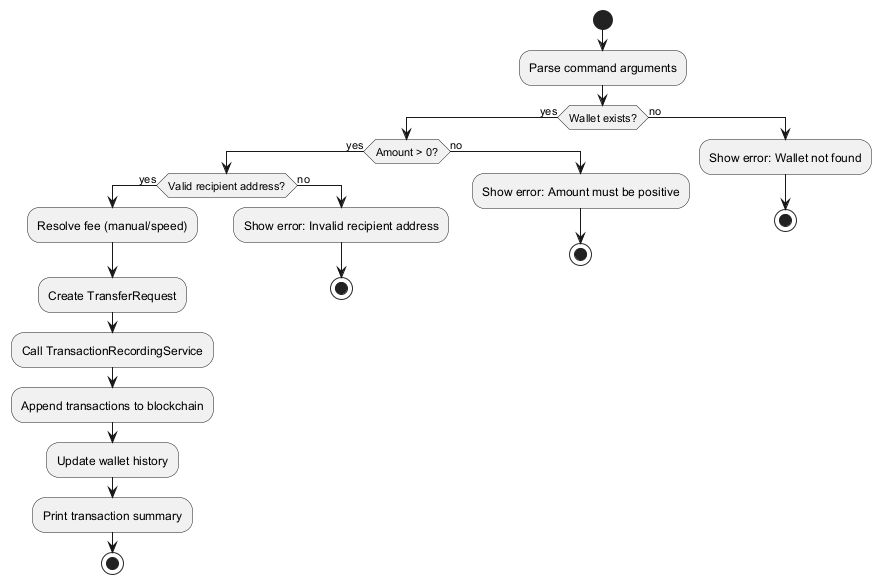
Validation sequence:
- parse prefixes
- verify wallet exists
- verify amount > 0
- validate recipient address format
- resolve fee (manual or speed-based)
- pass the transfer to
TransactionRecordingService - output a detailed transaction summary including all relevant fields (wallet, recipient, amount, speed, fee, note)
SendCommand diagrams
The following diagrams document the static structure, validation, and activity flow of the send command:
- Class diagram: Static structure and dependencies
- Validation sequence diagram: Error handling and validation logic
- Activity diagram: High-level execution and decision flow
Key design points shown in the diagrams:
SendCommandinherits fromCommand.SendCommanddepends onWalletManagerto validate sender wallet existence.SendCommandcreatesTransferRequestand delegates transfer persistence toTransactionRecordingService.TransactionRecordingServiceperforms blockchain write operations throughBlockchain.
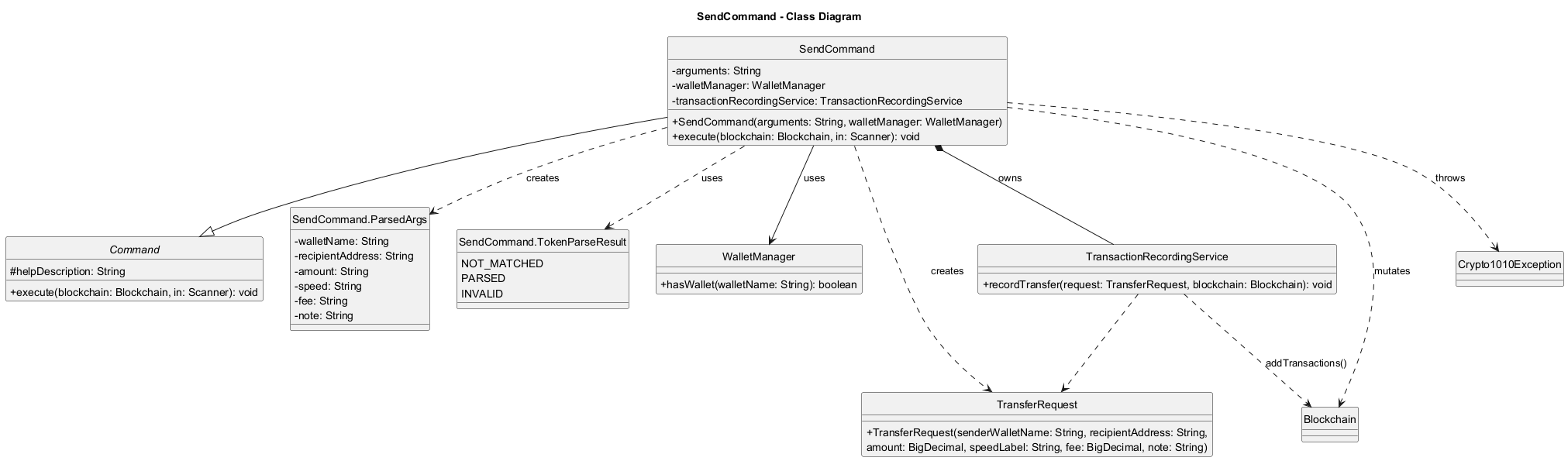
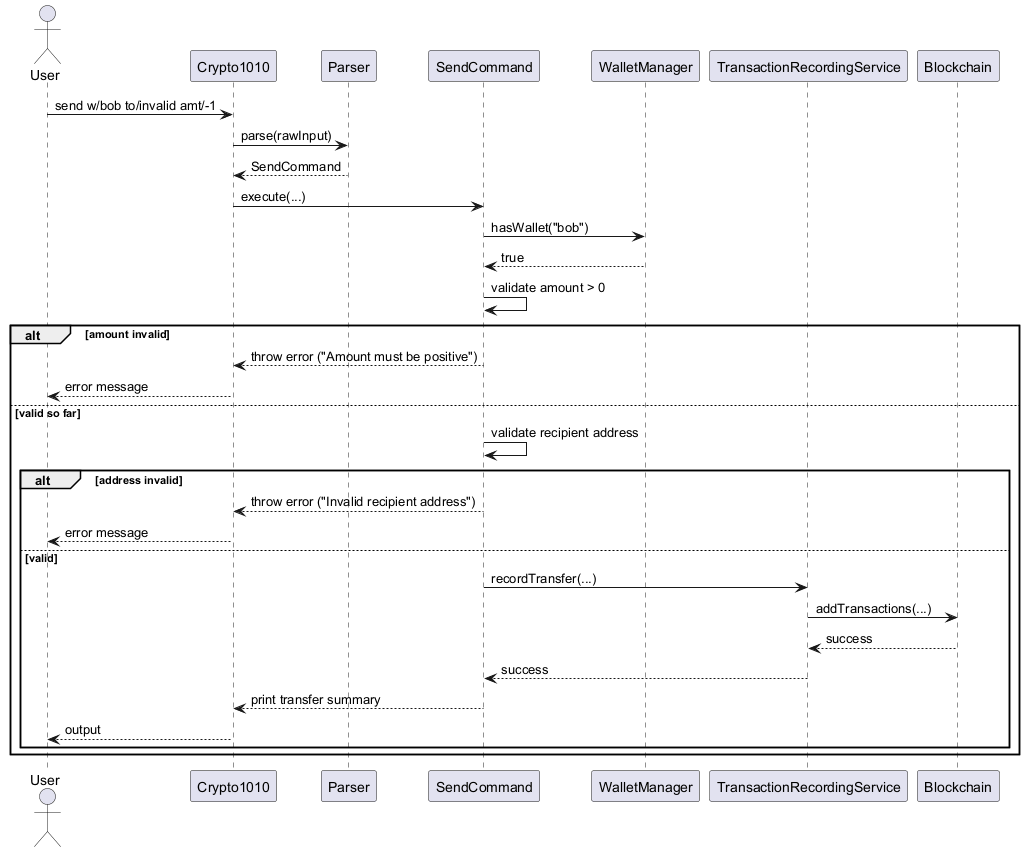
Centralized transfer recording
TransactionRecordingServiceis the single write path for successful transfers.- It verifies the sender wallet exists and has sufficient balance for
amount + fee. - It records blockchain transactions and the sender wallet history from the same
TransferRequest. - Local recipient addresses are normalized to wallet names on-chain when a matching wallet exists.
- This service and its integration with
SendCommandwere refactored and tested by jainamashah to ensure atomicity and correctness of transfer and fee logic.
crossSend command implementation
CrossSendCommandacceptsacc/,amt/, andcurr/.- It resolves the sender from the current account’s wallet tagged with the given currency.
- It verifies:
- recipient account exists
- sender and recipient accounts are different
- amount is positive
- the sender has sufficient balance
- there is exactly one wallet for that currency in the current account
CrossAccountTransferServiceloads the recipient account’s wallet and blockchain storage, creates a recipient wallet for the same currency when missing, and appends mirrored transactions to the two account chains.- Cross-account chain entries use an
external:prefix, andBlockchain.validate()treats those synthetic accounts as exempt so recipient chains can accept inbound credit without requiring a local sender balance. - The cross-account transfer flow, its validation, and its test coverage were improved by jainamashah to ensure correct behavior for new and existing recipient wallets, and to provide clear error messages for all edge cases.
history command implementation
HistoryCommandreads the persisted wallet send history fromWallet.- It validates
w/WALLET_NAME, resolves the wallet case-insensitively throughWalletManager, and prints numbered entries. - The command is intentionally wallet-local: it shows recorded outgoing send history, not a reconstructed blockchain-wide ledger view.
viewchain command implementation
ViewChainCommandis a read-only blockchain overview command.- It computes:
- total blocks from
blockchain.getBlocks().size() - total transactions by summing each block’s transaction count
- total blocks from
- It prints a compact per-block view containing index, transaction count, timestamp, and a shortened hash preview.
- This gives expert users a fast chain summary before drilling into individual blocks with
viewblock.
Persistence implementation
Structural view (class diagram)
The class diagram below introduces storage-layer classes before persistence behavior details.
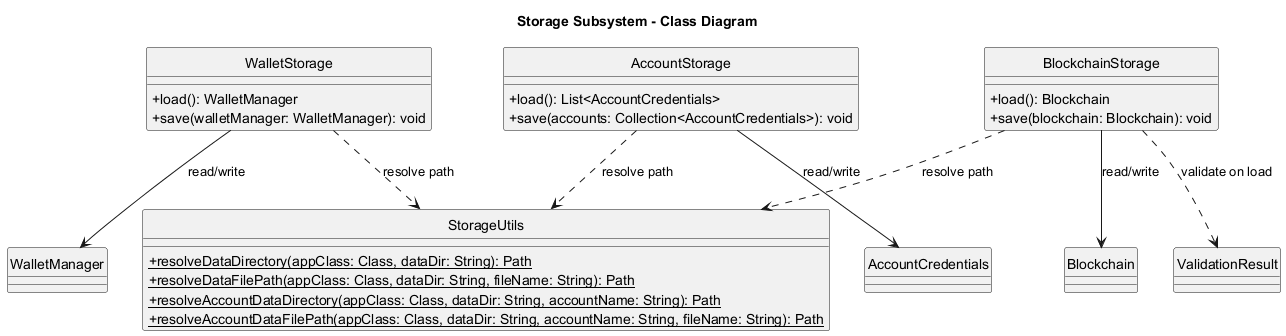
AccountStoragepersists hashed credentials indata/accounts/credentials.txt.AccountStoragestores an HMAC signature header incredentials.txtand a local signing key indata/accounts/credentials.keyto detect credential-file tampering.BlockchainStorageserializes blockchain state todata/accounts/USERNAME/blockchain.json.WalletStoragepersists wallet names, wallet currencies, and transaction history indata/accounts/USERNAME/wallets.txt.- On startup,
Crypto1010authenticates first, then loads blockchain and wallet data for the current account only. - If loading fails, the app falls back to a default blockchain and/or an empty wallet list.
- After a load failure, save is disabled for that data type in the current session to avoid overwriting possibly corrupted files.
- Parser/storage paths enforce conservative input/file-size limits to reduce denial-of-service style oversized payloads.
- If save fails during an authenticated session, the app exits instead of continuing with partially persisted state.
Product scope
Target user profile
- Students and beginners learning blockchain fundamentals through a terminal-based workflow.
- Users who prefer lightweight, text-based interaction instead of a GUI.
- Developers who want a small Java codebase suitable for extension and experimentation.
Value proposition
Crypto1010 provides a compact, practical environment to understand wallet transfers, block structure, hash linkage, and blockchain validation without requiring external infrastructure or a real network.
User Stories
| Version | As a … | I want to … | So that I can … |
|---|---|---|---|
| v1.0 | new user | view usage instructions | quickly learn available commands |
| v1.0 | user | create wallets | simulate distinct senders and receivers |
| v1.0 | user | list wallets | confirm available wallets in the current session |
| v1.0 | user | check wallet balance | verify transaction effects numerically |
| v1.0 | user | send funds with fee controls | model transfer and fee trade-offs |
| v2.1 | user | send funds to another account with the same currency | move balances between login accounts without exchanges |
| v1.0 | user | view my wallet send history | review past outgoing transfers |
| v1.0 | user | validate the blockchain | confirm chain integrity after modifications |
| v2.2 | expert user | view a blockchain overview | quickly inspect chain size and per-block summaries |
| v1.0 | user | inspect a specific block | view exact block-level transaction data |
Planned enhancement: cross-account address resolution
- User story: As a user, I can send to another account using a wallet address instead of an account name.
- Persist generated wallet addresses across restarts.
- Extend recipient lookup beyond the current account without requiring
acc/ACCOUNT_NAME.
Non-Functional Requirements
- The application shall run on Java 17.
- The application shall be usable entirely via CLI input/output.
- Blockchain data shall persist locally in
data/accounts/USERNAME/blockchain.json. - Validation shall be deterministic for the same stored blockchain input.
- The codebase shall remain modular enough to support adding new commands with minimal cross-component changes.
- The project shall support automated unit testing via JUnit 5 and Gradle.
Glossary
- Blockchain: Ordered chain of blocks linked by previous hashes.
- Block: A unit containing index, timestamp, previous hash, current hash, and transactions.
- Wallet: A logical identity used as sender/receiver in transactions.
- Transaction: A transfer record in the format
sender -> receiver : amount. - Validation: Integrity checks covering hash correctness, linkage, and transaction validity.
- Network fee account: Internal sink (
network-fee) receiving fee deductions fromsend.
Instructions for manual testing
Prerequisites
- Java 17 installed and configured.
- Project cloned locally.
Running the app
- Run
./gradlew run(or.\gradlew runon Windows PowerShell).
Manual test cases
The following test cases were contributed and maintained by jainamashah to ensure robust coverage of all major flows and edge cases:
- Authentication:
- Launch the app.
- At
Choice:, enter2(orregister). - Enter a username and password.
- Expected: account is created and the app logs in to that account.
- Relaunch the app and at
Choice:, enter1(orlogin) with the same credentials. - Expected: login succeeds and the same account data is loaded.
- Press
TabatChoice:. - Expected: only auth-scope suggestions (
1,2,3,login,register,exit) are offered. - After successful login, press
Tabin command prompt. - Expected: command-scope suggestions are offered, and auth menu suggestions are no longer offered.
- Enter a valid username with wrong password 5 times.
- Expected: subsequent login attempts for that username are temporarily rejected for 30 seconds.
- Help
help- Expected: prints out the list of commands
help c/list- Expected: prints out details about the list command
- Tutorial
tutorial start- Expected: begins interactive tutorial guiding through steps needed to make a simple transaction
tutorial exit- Expected: exits the interactive tutorial
- Create wallets:
create w/alicecreate w/bob- Expected: confirmation messages for each wallet.
create w/main curr/btc- Expected: wallet created message showing currency
btc.
- List wallets:
list- Expected: numbered wallet list including
alice,bob, and any currency-tagged wallet with its currency shown.
- Generate wallet keys:
keygen w/alice- Expected: wallet address is generated and shown.
- Run
keygen w/aliceagain. - Expected: error that wallet already has a key pair.
- Check balance:
balance w/bob- Expected: balance displayed with 8 decimal places.
- Successful transfer:
send w/bob to/0x1111111111111111111111111111111111111111 amt/1- Expected: success output including wallet, recipient, amount, speed, and fee.
- Invalid transfer format:
send invalid- Expected: invalid send format error.
- Invalid recipient address:
send w/bob to/not-an-address amt/1- Expected: invalid recipient address error.
- View wallet send history:
history w/bob- Expected: either numbered outgoing send history entries or a no-history message.
- Successful cross-account transfer:
- Register/login as account
sender. create w/main curr/btc- Ensure
mainhas some balance in your test data. - Register a second account
receiver. crossSend acc/receiver amt/1 curr/btc- Expected: success output showing sender wallet, recipient account, recipient wallet, and currency.
- Login as
receiver. list- Expected: a
btcwallet exists if one was not already present.
- Register/login as account
- Logout and switch account:
- Log in as any existing account.
logout- Enter
n. - Expected: logout is cancelled and the session continues.
logout- Enter
y. - Expected: account access menu is shown again and you can
loginorregisteras a different user.
- Validate chain:
validate- Expected: valid-chain success message unless data is corrupted.
- View blockchain overview:
viewchain- Expected: total block count, total transaction count, and compact block rows are printed.
- View block details:
viewblock 1- Expected: full block metadata and transaction list.
- Out-of-range block:
viewblock 999- Expected: block index out of range error.
- Exit:
exit- Expected: program terminates and blockchain state is saved.
Data reset / test isolation
- Delete or replace
data/accounts/USERNAME/blockchain.jsonanddata/accounts/USERNAME/wallets.txtto reset one account. - Delete
data/accounts/credentials.txtonly if you also want to remove registered login accounts.